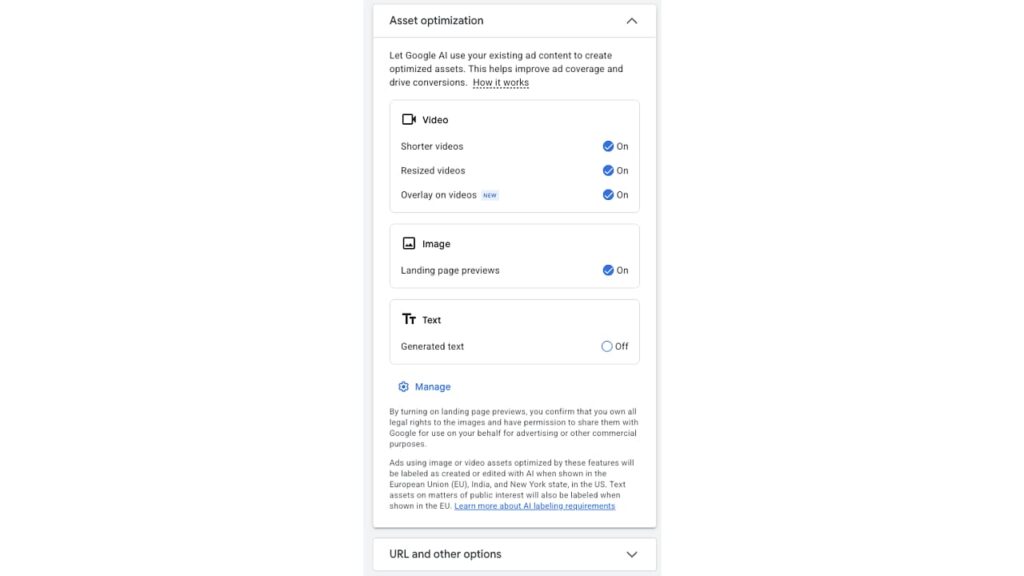
Google Ads is introducing a new “Overlay on videos” asset optimization setting for Demand Gen campaigns, allowing Google to automatically add text messaging to video creatives.
What’s new.
The setting appears under Asset optimization in Demand Gen campaigns, alongside the existing “Shorter videos” and “Resized videos” options.

How it works.
When enabled, Google uses an advertiser’s existing text assets to generate overlays containing key messages, which are then displayed on top of video ads.
The catch.
The new setting appears to be enabled by default, meaning advertisers could have text added to their videos unless they review their asset optimization preferences.
How to control it.
Advertisers can turn off “Overlay on videos” individually or select “Disable all” to switch off the available video optimization features.
Why we care.
Text overlays could make video ads more effective by reinforcing product benefits, promotional messaging or calls to action, particularly when users watch without sound.
However, automatically generated overlays may also interfere with existing video designs, cover important visual elements or introduce messaging that doesn’t match the intended creative.
Another consideration.
Google notes that ads using image or video assets modified by these optimization features are labeled as created or edited with AI when served in the European Union, India and New York state.
The bottom line.
Automatic video overlays could improve how Demand Gen ads communicate key messages, but advertisers should review the new setting — particularly if they want to maintain full control over how their video creatives appear.